Batch window
The Batch window displays information about the current open batch, and provides a button for selecting a different open batch.
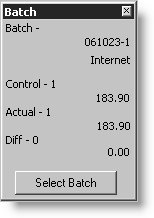
This window specifies the following information.
- Batch - The name and description of the current open batch
- Control - The control count and control amount
- Actual - The actual count and actual amount
- Diff - The differences between the control and actual values
- Select Batch - Displays the Open Batches window
To print batches
After you have entered all of the transactions for a batch or group of batches, click Print Selected or Print Open to print the batch transaction report, where you can review the batch details and check the batch balancing
- From AR/Cash, select Manage batches to open the Manage batches window.
- To print a report for a selected batch, select the batch and click Print Selected.
- To print reports for all open batches, click Print Open.
The batch report lists the detail of each transaction entered and lets you compare the actual figures against the control totals, warning you if they are different. The report also provides a GL accounting summary report.