Fundraising Dues Items
Dues products can be flagged as Fundraising items. When a payment is made for a cash dues fundraising product, Fundraising data is recorded, Fundraising reports and summaries reflect the payment, and the appropriate level of Donor Club is awarded to the donor.
Dues Fundraising product set up
If you are licensed for Fundraising, you can flag a dues product as a Fundraising Item and can designate the Fair Market Value, Appeal, and Campaign for the item. If you have multi-entity enabled, you can also designate the Fund for the product.
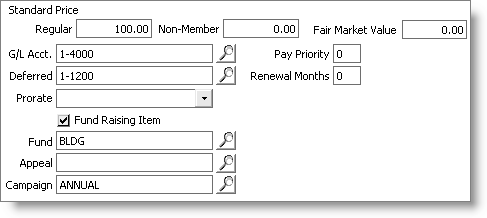
Note: When multi-entity is enabled and Fundraising Item is checked, the Fund field lookup is populated with Org Codes whose type is Fund. When multi-entity is enabled and Fundraising Item is cleared (not checked) the Entity field lookup is populated with all Org Codes.
Billing accrual dues with Fundraising items
When accrual dues are billed, Fundraising items are marked as such on reports and invoices.
A Pledge activity is created for each separate dues Fundraising product when accrual dues are billed.
Dues payments
On the Dues payment window, Cash receipt window, and Service Central payment windows, iMIS flags payments made on Fundraising items. A "Gift" Activity is generated for each payment applied to a dues product.
Note: Credit or Debit Memos applied to Dues Fundraising products are flagged as Fundraising and use the same entities as the dues products they apply to.
Whether on a cash or accrual basis, when a company pays dues for an individual, the individual is considered the donor.
Dues Fundraising products count towards Donor Club membership.
Dues Fundraising items in Customer Portfolio Fundraising history
Accrual dues donations are considered Pledges; cash dues donations are considered Gifts. Dues donations are reflected in the Fundraising Summary in the following locations:
- Summary - Dues transactions are grouped by Trans number and donor ID.
- Donor History - A gift or pledge for multiple donations with different target funds, campaigns, or products is shown as "split" in the Fund, Campaign, or Distribution columns.
- Donor History Detail - Appeal and Campaign are listed at the product level. There are adjustments and payments sections for accrual dues transactions. The payments section for dues pledges shows the pledge, and the pledge amount and balance with pledge payments listed on separate lines below the pledge. There is also a payments section for cash dues, but there is no adjustments section.
- Donor Recognition - shows all of the donor clubs the donor has qualified for, including those qualified for with Dues Fundraising products.
Fields supporting fundraising on the Customer Portfolio Billing tab and on the Subscriptions window
The Billing tab in the history section of the Customer Portfolio has the FR Item field, to indicate which items are Fundraising items.
The Dues/Subscription Item Detail window includes Appeal, Campaign, and Fair Market Value read-only fields for Fundraising products and displays a note at the bottom of the screen designating the product as a Fundraising product.
Source Codes and Appeal Codes for dues payments
If there is an Appeal Code defined for a Dues Fundraising product, that Appeal Code will be used for all payments for that product. In the absence of a product-specific Appeal Code, if a Source Code is entered during a payment, that Source Code will be used as the Appeal Code for that payment.
Gift Portfolio
If a donor has made prior donations through the Gift Portfolio, the giving summary in the Enter and edit gifts window includes Dues Gifts and Pledges and uses the Total Value options chosen in Fundraising > Set up module.
*Tab on cash dues payments
The *Tab feature can be used to apply open credit invoices to Gifts (Cash Dues).
Billing Payment Importer
The Billing Payment Importer supports Dues Fundraising products by:
- Flagging them as Fundraising items
- Recording the necessary appeal, campaign, and fund
- Creating a GIFT activity for cash dues
- Awarding Donor Club membership
Import Utility
The Import Utility supports Dues Fundraising products by:
- Flagging them as Fundraising items
- Recording the necessary appeal, campaign, and fund
- Creating a GIFT activity for cash dues
- Awarding Donor Club membership
- Associated subscription lines also store the appeal, campaign, and fund of the product