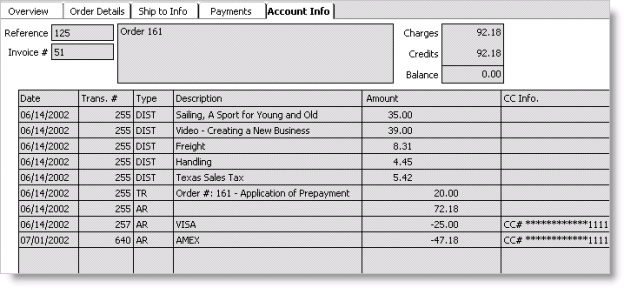
Enter and edit orders window - Account Info tab
The information on this tab is read-only. The ledger (table) view displays each transaction for an order and includes the following transaction information: date, number, type, description, amount, and any applicable credit card information such as the credit card number, credit card expiration date, and the name on the credit card.
Note: If Advanced PCI Compliance (see Implementing Advanced PCI Compliance options) > Do not retain cardholder information is enabled, iMIS saves transactions without cardholder data and shows only gateway reference number and authorization code fields.
To view account information
You can select the Account Info tab for invoiced orders only.
- From Orders, select Enter and edit orders to open the Enter and edit orders window. The Overview tab displays by default.
- Open the invoiced order (see Finding orders) for which you want to open the transaction ledger.
- Select the Account Info tab to view the order's account information.