Last updated on: June 23, 2026
Granting iDMS access to IQA queries and panel sources
For iDMS to read and write data in iMIS, certain REST API access settings must be enabled on the IQA queries and custom panel sources your jobs reference. Review the following to understand what is required, how to configure the settings in iMIS, and what error messages to expect if the settings are missing.
Updating panel sources
When an iDMS import mapping references a custom panel source, iDMS validates that the panel source has the correct REST API access configured in iMIS. The following checks are performed:
| Requirement | When it applies |
|---|---|
| Available via the REST API must be enabled | All background accounts, always |
| Public Access Permissions – Read, Add, Update, and Delete must all be granted | Only when the background account is not a System Administrator (SysAdmin) or Staff user (IsStaff) |
If either check fails, a red error banner blocks the import on the Map and Validation pages until the issue is resolved.
Do the following to update custom panel sources:
- Go to RiSE > Panel Designer > Panel sources.
- Search for and open a custom panel source.
- Click the Security tab.
- Enable Available via the REST API.
- If public access permissions are required, update the access list appropriately.
- Click Save.
- Repeat this process for all custom panel sources used by iDMS.
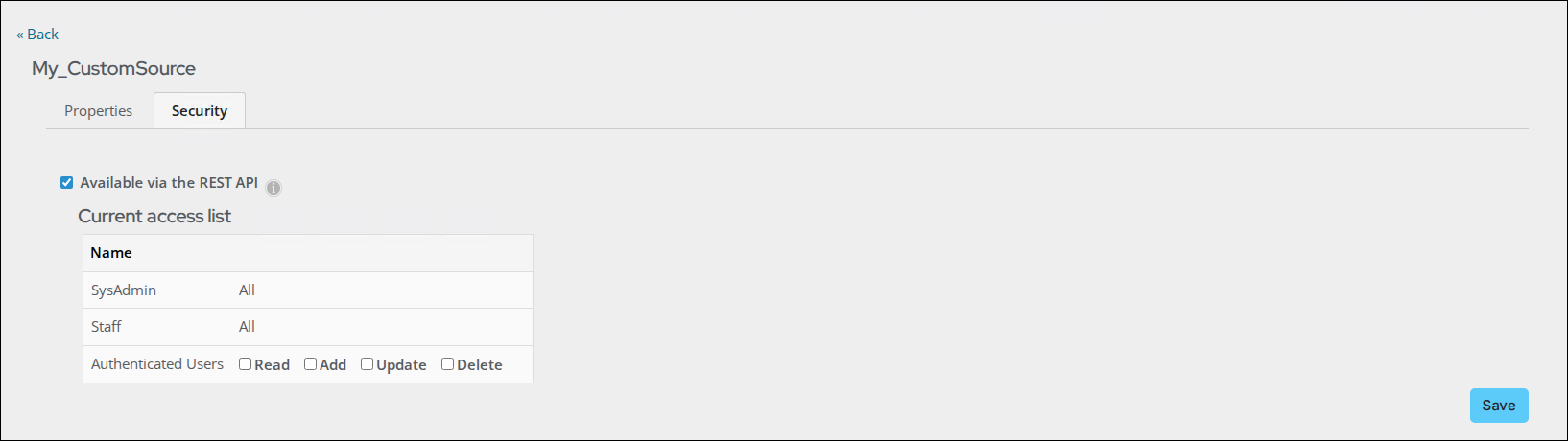
The out-of-the-box panel sources automatically have REST API access enabled by default. This configuration is only required for custom panel sources.
Updating the queries
IQA queries used by iDMS — for example, as the source for an iUpdate job — must also have Available via the REST API enabled. Without this setting, iDMS cannot access the query results.
To update queries used by iDMS, do the following:
- Go to RiSE > Intelligent Query Architect.
- Search for and open the query.
- Click the Security tab.
- Enable Available via the REST API.
- If public access permissions are required, update the access list appropriately.
- Click Save.
- Repeat this process for all queries used by iDMS.
Understanding the error messages
If a panel source fails the REST API validation check, a red error banner appears on the Map and Validation pages in iDMS. The import is blocked until all listed issues are resolved.
The following error messages may appear:
Error: REST API access not enabled
Enable ‘Available via the REST API’ for the panel source ‘ABC’ to allow access for iDMS.
What it means: The named panel source does not have the Available via the REST API setting enabled. This check applies to all background accounts.
How to resolve: Follow the above steps to enable the REST API setting on the named panel source.
Error: Missing CRUD permissions
Panel source ‘XYZ’ is missing these permissions for iDMS: Read, Add, Update, and Delete.
What it means: The named panel source is missing one or more of the required Public Access Permissions. This check applies when the iDMS background account is not SysAdmin or IsStaff.
How to resolve: Follow the steps above to grant all four permissions (Read, Add, Update, Delete) on the named panel source.