Last updated on: June 23, 2026
Troubleshooting and known limitations
Review the following common troubleshooting steps, as well as known connector limitations for the iMIS Power Automate Connector:
Known limitations
Be aware of the items below for a summary of current known limitations and expected behavior.
General
The following encompass generally accepted limitations regarding the iMIS Power Automate Connector:
- When fetching multiple pages, results will always be in multiples of 200 records, due to limitations with pagination in the iMIS API. For example, if you request 225 records, you will receive up to 400 records.
- You can use other iMIS Power Automate Connection actions, such as a loop or custom code, in order to further refine the results to the correct number of records, if your business case requires it.
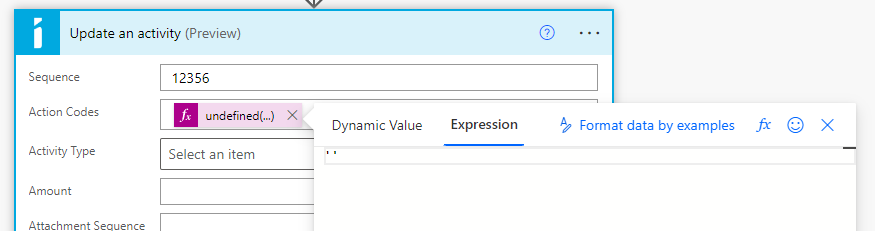
- When updating records, any fields that are left blank in the action will not be altered. To explicitly exclude a field, insert an empty string ('') using an expression.
Triggers
The following encompass limitations regarding triggers:
- Triggering a workflow when an activity or order is updated or deleted in iMIS is not currently supported. Only record creation ("inserts") cause the trigger to fire.
- The iMIS triggers do not have any filters, however you can use the built-in Power Automate Trigger Conditions to only run the workflow for certain activity types or order categories. Find examples of this on the Action and Trigger Reference page.
Panels and Business Objects
The following encompass limitations regarding iMIS panels and business objects when using the iMIS Power Automate Connector:
- Not all business objects are listed in the drop-down. However, if you select Enter custom value, and manually enter the name of a valid business object ( CsOrderLines or NetContactBasic), the connector will populate the correct list of fields for you. This is supported on Find and Get operations only. Updating or deleting records using a business object is not supported by iMIS, and therefore also not supported by the iMIS connector. (Panel records can still be updated and deleted normally.)
Party
The following encompass limitations regarding connections using the Party business objects:
- Updating other addresses besides the Mailing address purpose is not supported at this time.
- Updating or deleting a contact's photo is not supported at this time.
- When creating a person or an organization, if you manually supply a member type code that is different than the type of object you are creating, iMIS will create the record type that matches the member type, which will cause the results of the action in Power Automate to be inaccurate.
- For example, if you use the Create a person action and manually specify a company member type, such as CM, the record that is created will actually be an Organization record in iMIS, but the response data in the action will attempt to be mapped incorrectly to a Person record.
Activity
The following encompass limitations regarding activity records:
- Deleting activity records is not supported at this time.
iMIS 2017
The following actions are not supported on iMIS 2017:
- Single and Multi-instance Panel Operations
- Fetch IQA
Troubleshooting
Review the information below to diagnose and resolve issues related to error codes.
401 Unauthorized
A 401 Unauthorized error when calling an iMIS connector action can be due to one of many issues:
- Invalid API key
- Cloud ID account setup is incomplete
- Background Account is not valid
Inspect the 401 error response in iMIS Power Automate Connector and look for a response header called X-CSI-Error-Msg. This code will identify the issue. For further assistance, contact ASI Technical Support.
500 Internal Server Error
A 500 Internal Server Error is likely due to an error that has occurred from within the iMIS REST API. Inspect the response body. If there is a Message property, it will contain the iMIS API path, as well as the error message. For further assistance, contact ASI Technical Support.