Last updated on: June 23, 2026
 iMIS Text Messenger (formerly Text Manager)
Note: In order to use iMIS Text Messenger, you must be licensed. For more information, contact your AiSP or CPIL.
iMIS Text Messenger is a cloud-based Twilio integration for iMIS that allows marketing communication texts/SMS messages to be sent to members. The app will allow staff to schedule text campaigns to go out on a schedule, one-time, or recurring.
Basic system requirements
Review the following system requirements:
- iMIS Version: iMIS EMS or iMIS 2017
- Toll-free numbers: The messaging industry has introduced new limits on the number of messages that can be sent from Restricted (formerly “unverified”) and Pending (submitted but not yet approved) toll-free numbers. In addition to these limits, carriers will apply increased message filtering:
- If your toll-free numbers are already verified, no action is required.
- Restricted and Pending numbers are subject to both message volume limits and heightened filtering.
- Opt-in settings (Required for verification): To be considered for toll-free verification, carriers require that you have clear opt-in language on your website within your membership profile information, specifically for collecting mobile phone numbers:
- When submitting your toll-free verification request, include a link to a screenshot of the opt-in language in the opt-in workflow image URLs field.
- During the Pending state (after submission but before approval), your number will remain under the restrictions mentioned above.
- Throughput for approved toll-free numbers:
- Throughput: 3 MPS (messages per second)
- Maximum segments per campaign: 20,000
Home dashboard
To access the Home dashboard for Text Messenger, do the following:
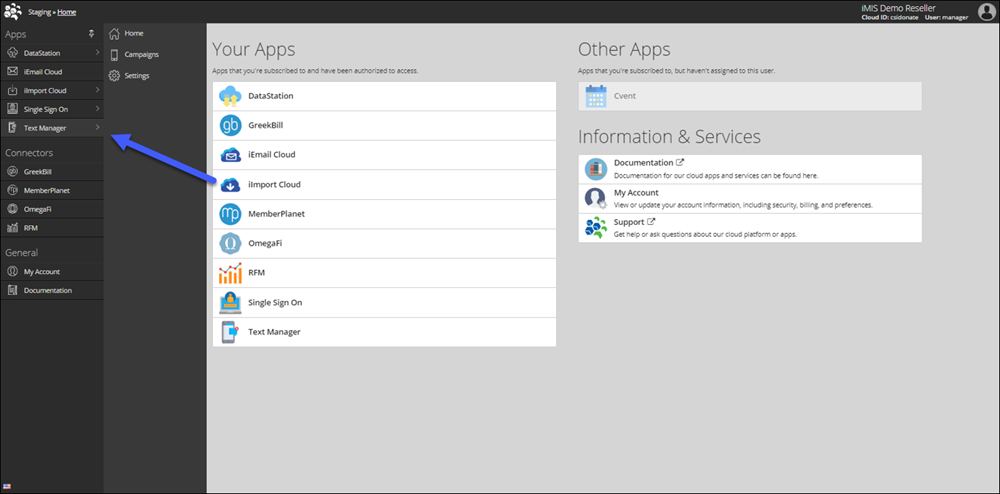
- Log into the Cloud Dashboard.
- Go to Text Manager > Home.
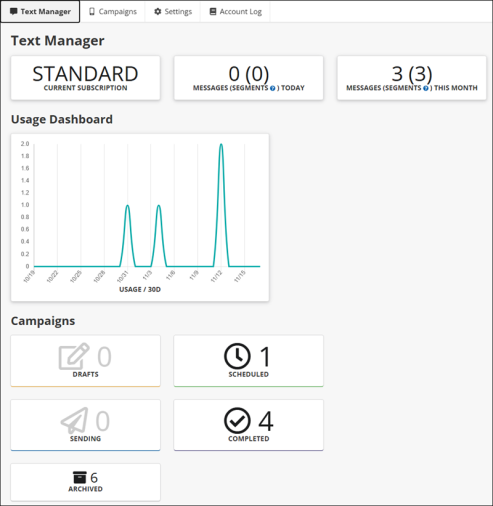
The Home dashboard provides the following information:
- Current subscription: Your organization's current subscription level.
- Messages (segments) today: Number of texts sent today.
- Messages (segments) this month: Number of texts sent this month.
- Usage dashboard: Usage over the last 30 days.
- Drafts: Current campaigns in the draft stage.
- Scheduled: Current Campaigns in the Scheduled stage.
- Sending: Current Campaigns in process.
- Completed: Current Campaigns Completed.
- Archived: Archived Campaigns.
Campaigns
To access the Campaigns for Text Messenger, do the following:
- Log into the Cloud Dashboard.
- Go to Text Manager > Campaigns.
Review the following for details:
Settings
To access the Settings for Text Messenger, do the following:
- Log into the Cloud Dashboard.
- Go to Text Manager > Settings.
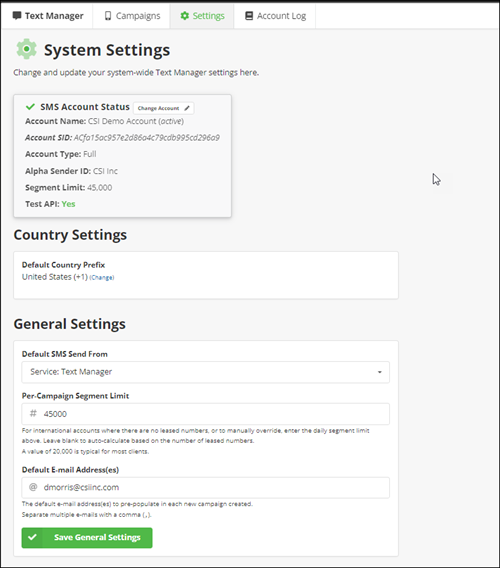
- The following settings are available:
- SMS Account Status: The SMS Account Status area displays key details about the connected SMS account, including the account name, SID, and type. It also shows the configured Alpha Sender ID, the maximum number of message segments your account can send, and whether test API mode is enabled. From this section, you can also change the linked account or update the API key.
- Country Settings:
- Default Country Prefix: The default country prefix is automatically added to any phone number returned by the query. However, if the returned phone number already begins with a “+”, the default prefix is ignored.
Example: The default prefix is set to United States (+1), but the query returns a UK phone number (+44 20 7234 3456). iMIS Text Messenger will recognize the existing “+44” and send the message to the UK number without adding “+1.”
- General Settings:
- Default SMS Send From: This should either be set to your Text Manager messaging service (if you are using supplemental features like Alphanumeric Sender IDs), or your toll-free number.
- Per-Campaign Segment Limit: It is recommended to set this value between 15,000-30,000. Any higher, and there is a possibilty of hitting Twilio rate limits and having your messages be blocked.
- Default email Address(es): This setting should be populated with the administrator email. This email (along with the Campaign email) will be used if anything goes wrong in sending the messages.
Twilio pass-along charges
With Twilio’s recent updates, they now charge for failed text messages. This most often occurs when you send a campaign to members who have previously unsubscribed (for example, by replying “STOP” or “QUIT”). Twilio applies a fee of $0.001 per message (not per segment).
To help reduce these charges, we have enabled tracking for iMIS users who unsubscribe. You can then exclude these users from your IQA Target Audience to avoid sending messages to them in the future. See Tracking unsubscribed and re-subscribed members for more details.
We have also seen an increase in charges related to SMS Pumping Protection, a Twilio feature designed to detect and block suspicious SMS activity. Pumping Protection is free for messages sent to US and Canadian recipients. However, messages sent to recipients outside the US and Canada may incur charges, depending on the message context and the region. These rates vary by country.
Because this landscape is changing rapidly, we will do our best to keep all charges as transparent as possible. If you have any questions, contact ASI Support.