Last updated on: June 19, 2026
QuickStart Template
Member directory
The QuickStart Template includes the following sample member directories that are accessible from the public site:
- The Simple Member Directory shows all individual members with a basic amount of information.
- The Simple Member Org Directory shows organization members with a basic amount of information.
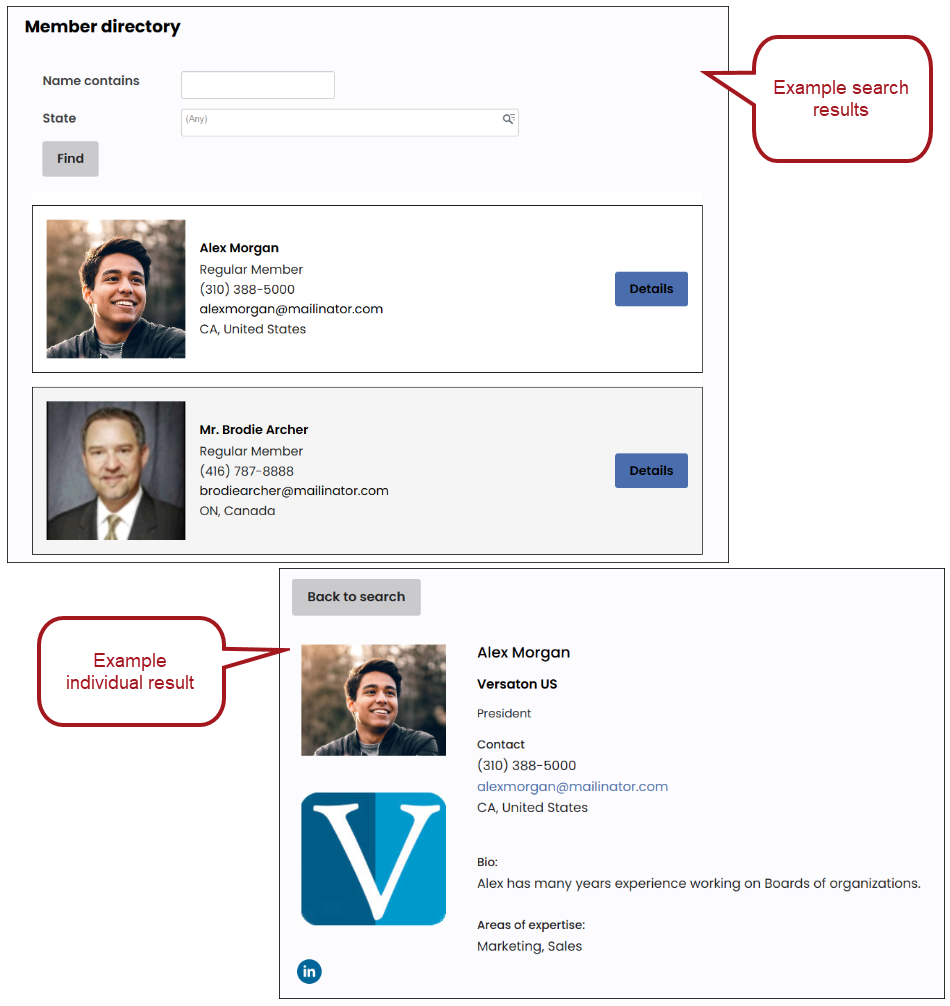
- The Detailed Member Directory shows all individual members. Each member entry has a Details button. When a user clicks Details, they go a page with more detailed information about the member.
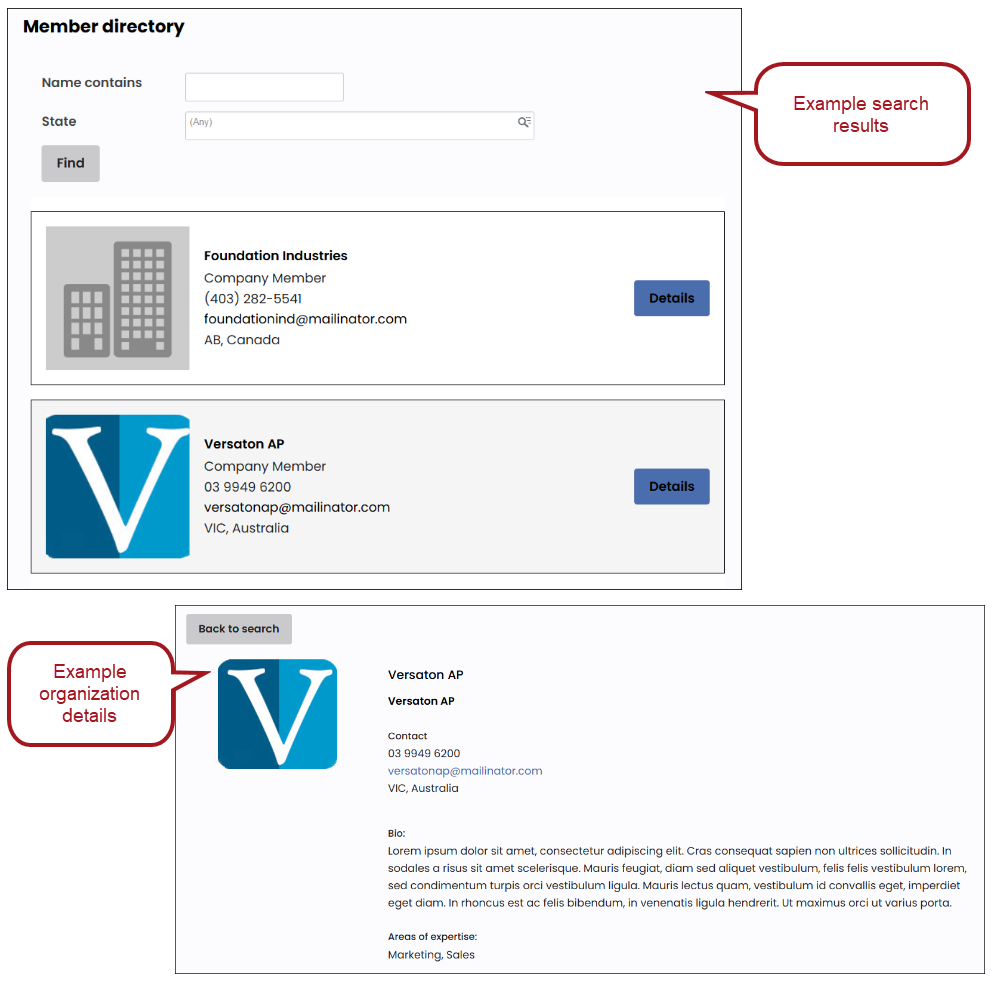
- The Detailed Member Org Directory shows all organization members. Each member entry has a Details button. When a user clicks Details, they go a page with more detailed information about the member.
In This Article
- Simple Member Directory
Simple Member Org Directory
Detailed Member Directory
Detailed Member Org Directory
Simple Member Directory
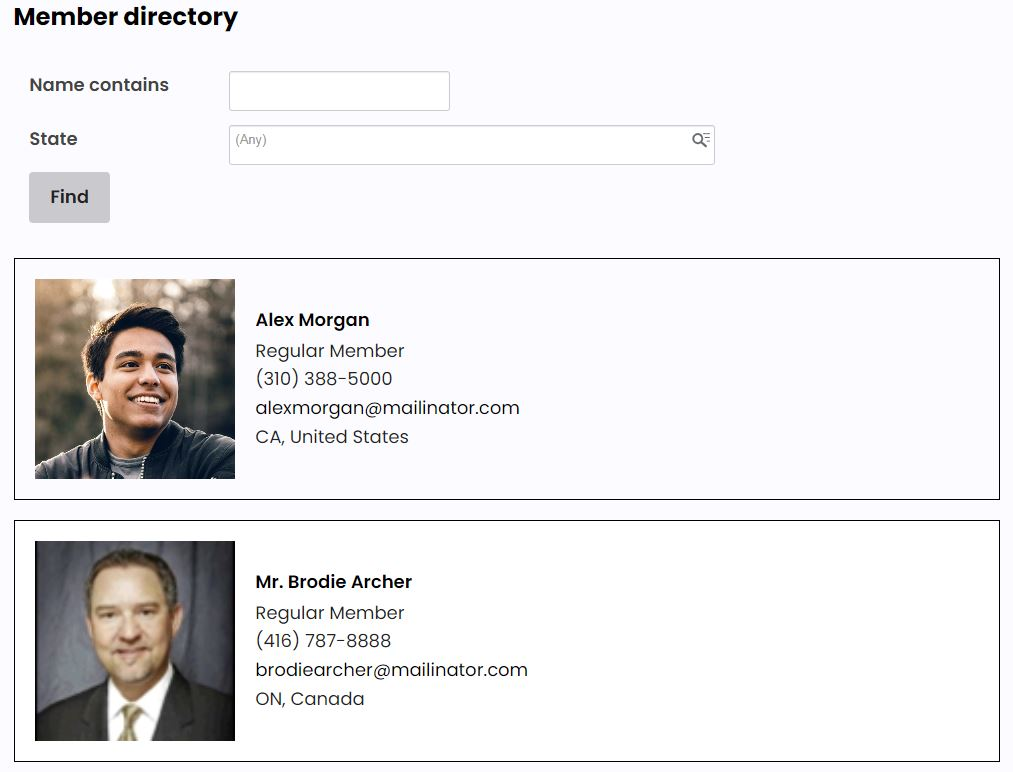
The Simple Member Directory shows all individual members with a basic amount of information:
- Profile picture
- Name
- Member type
- Phone number (if consented)
- Email (if consented)
- Location
Users are able to search records based on criteria you define.
Content pages
The Simple Member Directory is located at @/Web/Membership/Directory/Simple Member Directory.
This page displays the directory details from the Simple Member Directory query using a Query Menu content item.
Do not remove the following from the iPart CSS class property of the Query Menu content item (separated by a space):
clearQ– removes table stylingmemDir– CSS for the layout
Tip: As a best practice, profile images should be 200 x 200px for optimal display in the directory.
queries
The Simple member directory query is located at $/_MyWebsite/MemberDirectory/Simple member directory.
The query is filtered to show any individual contact who is currently a member, has a paid-through date greater than today, and has consented to appear in the directory. The query includes full name and state as search parameters. Add or remove search parameters from the Filters tab as required.
The Display properties are defined using a SQL expression. To add or remove properties from the listing, update the SQL expression in the Display tab.
Panel definitions
- _MyStaff_MemberDirectory – Defines the panel used on the Member Directory tab of a Staff account page.
- _MyWeb_Member Directory – Defines the panel used on the Member Directory tab of the public site account page.
Panel sources
- My_MemberDirectory – Defines the additional properties required to display member directory details, including consent to appear in the directory and whether the member allows their phone number and email to be visible.
Simple Member Org Directory
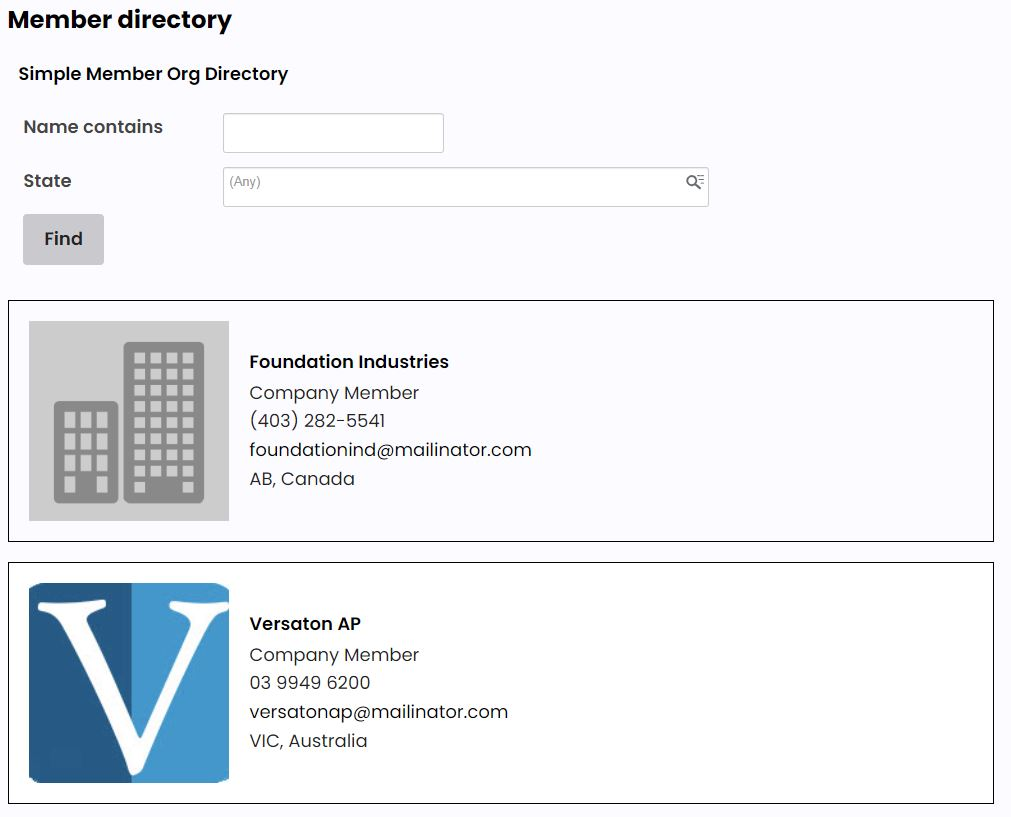
The Simple Member Organization Display shows a list of organization members with the following details:
- Profile picture
- Organization name
- Member type
- Phone number (if consented)
- Email (if consented)
- Location
Users are able to search records based on criteria you define.
Content Pages
The Simple Member Org Directory is located at @/Web/Membership/Directory/Simple Member Org Directory.
This page displays the directory details from the Simple member organization directory query using the Query Menu content item.
Do not remove the following from the iPart CSS class property of the Query Menu content item (separated by a space):
clearQ– removes table stylingmemDir– CSS for the layout
Tip: As a best practice, profile images uploaded against the contact record should be 200 x 200px for optimal display in the directory.
queries
The Simple member organization directory query is located at $/_MyWebsite/MemberDirectory/Simple member organization directory.
The query is filtered to show any company contact who is currently a member, has a paid through date greater than today and has consented to appear in the directory. The query includes two search parameters: full name and state. Add or remove search parameters from the Filter tab as required.
The Display is defined using a SQL expression. To add or remove properties from the listing, update the SQL expression in the Display tab.
Panel definitions
- _MyStaff_MemberDirectory – Defines the panel used on the Member Directory tab of a Staff site account page.
- _MyWeb_Member Directory – Defines the panel used on the Member Directory tab of the public site account page.
Panel sources
- My_MemberDirectory – Defines the additional properties required to display member directory details, including consent to appear in the directory and whether the member allows their phone number and email to be visible.
Detailed Member Directory
The Detailed Member Directory displays a list of members with the following initial details:
- Profile picture
- Name
- Member Type
- Phone number (if consented)
- Email (if consented)
- Location
Users can click a Details button to access a more detailed profile of the member, which includes:
- Company
- Bio
- Area of Expertise
- Socials
Users are able to search records based on criteria you define.
Content Records
The Detailed Member Directory uses the following content records:
| Site | Location | Title | Purpose |
|---|---|---|---|
| Public | @/Web/Membership/Directory/Member Directory | Member Directory |
Displays the directory details from the Detailed Member Directory query using a Query Menu content item. Important!
Do not remove the following from the iPart CSS classproperty of the Query Menu content item (separated by a space):
Tip: As a best practice, profile images uploaded against the contact record should be 200 x 200px for optimal display in the directory. |
| @/Web/Membership/Directory/Member Directory Details | Member Directory Details | Displays more detailed information about the member by using Query Template Display content items and Query Menu content item to display the data from the five Directory Details queries. | |
| @/Web/ContactManagement/Individuals/Tabs/Member Directory | Member Directory | Used for the Member Directory tab of the account page used on the public website. Displays the _MyWeb_Member Directory panel so that members can view and edit their directory details. | |
| Staff | @/MyStaff/ContactManagement/Individuals/Tabs/Member Directory | Member Directory | Used for the Member Directory tab of the Staff site account page. Displays the _MyStaff_MemberDirectory panel so that staff users can view and edit a member's directory details. |
queries
The Member Directory query is located at $/_MyWebsite/MemberDirectory/Member directory.
The query is filtered to show any individual contact who is currently a member, has a paid through date greater than today, and has consented to appear in the directory. The query includes two search parameters: full name and state. Add or remove search parameters from the Filter tab as required.
The Display is defined using a SQL expression. To add or remove fields from the listing, update the SQL expression in the Display tab.
Directory details
There are five queries that contain directory details on the Member Directory Details page, which a user can access by clicking the Details button on a member's listing:
- Directory details - Bio: Uses a Query Template Display content item to display a Biography and Areas of expertise, if the member has added them.
- Directory details - Contact: Uses a Query Template Display content item to display the member's location and work phone and email address if they consented to this information being shown.
- Directory details - Pictures: Displays the member's profile picture using a SQL expression.
- Directory details - Socials: Uses a Query Template Display content item to display the member's social networking account(s) if the member has added them.
- Directory details - Title: Uses a Query Template Display content item to display the member's name, organization and title.
Panel definitions
- _MyStaff_MemberDirectory panel - Defines the panel used on the Member Directory tab of a Staff site account page.
- _MyWeb_Member Directory panel - Defines the panel used on the Member Directory tab of the account page.
Panel sources
- My_MemberDirectory - Defines the additional properties required to display member directory details.
Detailed Member Org Directory
Displays a list of organization members with the following initial details:
- Profile picture
- Organization Name
- Member Type
- Phone number (if consented)
- Email (if consented)
- Location
Users can click a Details button to access a more detailed profile of the organization, which includes:
- Company
- Bio
- Area of Expertise
- Socials
Content records
The Detailed Member Org Directory uses the following content records:
| Site | Location | Title | Purpose |
|---|---|---|---|
| Public | @/Web/Membership/Directory/Member Org Directory | Member Org Directory |
Displays the directory details from the Detailed Member Directory query using a Query Menu content item. Important!
Do not remove the following from the iPart CSS class property of the Query Menu content item (separated by a space):
Tip: As a best practice, profile images uploaded against the contact record should be 200 x 200px for optimal display in the directory. |
| @/Web/Membership/Directory/Member Org Directory Details | Member Org Directory Details | Displays more detailed information about the member by using the Query Template Display and Query Menu content items to display the data from the five Directory Details queries. | |
| @/Web/ContactManagement/Organization/CoAdmin_Tabs/Directory Data | Directory Data | Used for the Member Directory tab of the public site account page. Displays the _MyWeb_Member Directory panel so that members can view and edit their directory details. | |
| Staff | @/MyStaff/ContactManagement/Individuals/Tabs/Member Directory | Member Directory | Used for the Member Directory tab of the Staff site account page. Displays the _MyStaff_MemberDirectory panel so that staff users can view and edit a member's directory details. |
queries
The Member organization directory query is located at $/_MyWebsite/MemberDirectory/Member Organization directory.
The query is filtered to show any organization contact who is currently a member, has a paid-through date greater than today, and has consented to appear in the directory. The query includes two search parameters: full name and state. Add or remove parameters as needed from the Filters tab.
The Display is defined using a SQL expression. To add or remove fields from the listing, update the SQL expression in the Display tab.
Directory details queries
Five IQA queries are used to display directory details on the Member Org Directory Details page:
- Directory Details – Bio: Displays Bio and Areas of expertise, if they have been entered.
- Directory Details – Contact: Displays the member’s location and work phone and/or email, if the member has consented.
- Directory Details – Pictures: Displays the member’s profile picture using a SQL Expression.
- Directory Details – Socials: Displays the member’s social links, if they have been entered.
- Directory Details – Title: Displays the member’s name, organization, and title.
Panel definitions
- _MyStaff_MemberDirectory – Defines the panel used on the Member Directory tab of a Staff site account page.
- _MyWeb_Member Directory – Defines the panel used on the Member Directory tab of the account Page.
Panel source
My_MemberDirectory – Defines additional properties required to display member directory details, including consent options for directory inclusion and displaying contact information.