Last updated on: June 23, 2026
Logs
To view payment logs, click on the Logs tab at the top of the page.
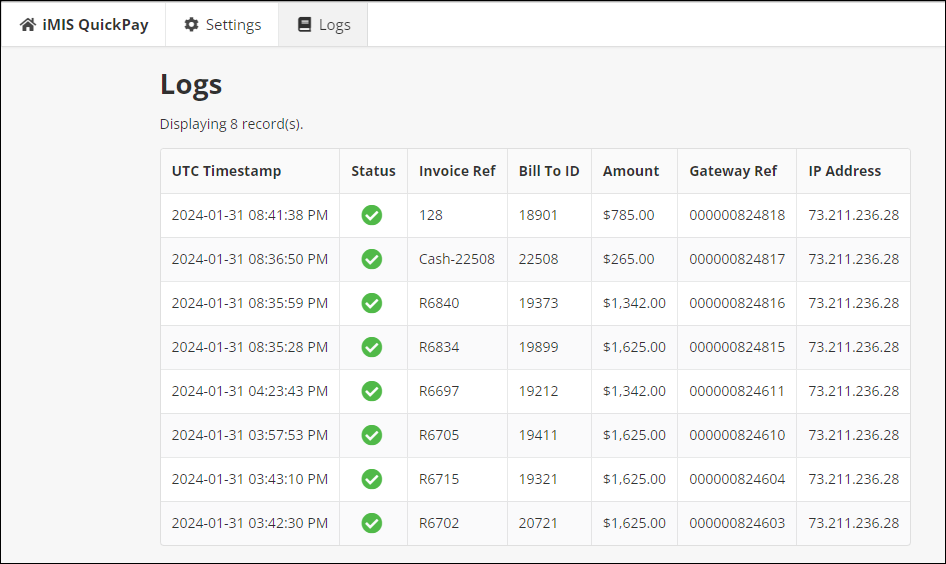
The logs screen shows the following information:
- Timestamp of the payment (in UTC)
- Payment Status (
 for success or
  for failure/error)
 - iMIS Invoice (Reference) Number
- iMIS Bill To ID
- Invoice Balance / Payment Amount
- Gateway Reference Number (Can be used to look up the payment in iMIS)
- IP Address of the payor who paid
- Error message (if the payment was not successful)
Limitations
- The log table shows only payments that were successfully processed by iMIS Pay and transmitted to our servers for final processing. Failed payment attempts—such as those due to insufficient funds, fraud declines, or deactivated credit cards—are not recorded in this table. If a payment issue occurs and no log entry appears in the QuickPay dashboard, contact ASI for assistance.
- At this time, it is not possible to export the logs. Support for CSV export may be added at a later date.
- The logs table is currently limited to only displaying the most recent 1,000 payment records.