Last updated on: June 29, 2026
Challenges
Note: This is an iMIS Crowdfunding edition feature.
Challenge Mode is an optional Template mode in Donate Now - Premium that allows a Donate Now - Premium staff user to set a predefined goal for a particular template. The template will display a progress tracker at the top of the form indicating the overall progress towards the goal.
The goal can be one of two distinct types: amount raised in dollars, or number of unique donors.
Activating Challenge mode
Do the following to activate Challenge mode:
- Edit a template and under the General tab
- Change the Template Mode to Challenge.
- Select one of the goal types via the radio buttons, and enter the target goal amount.
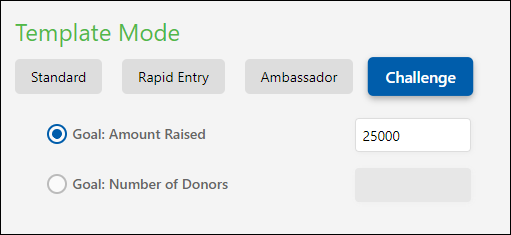
Note: The amount raised can be a decimal number, however the number of donors must be a whole number.
Note: To create an automatic time-limited challenge campaign, combine Challenge Mode with the Active From/Thru options in the template settings.
Tracking progress
The following contains information on tracking progress:
Progress Tracker on the Donation Form
Once the challenge has been enabled, a progress tracker will appear on the donation form:
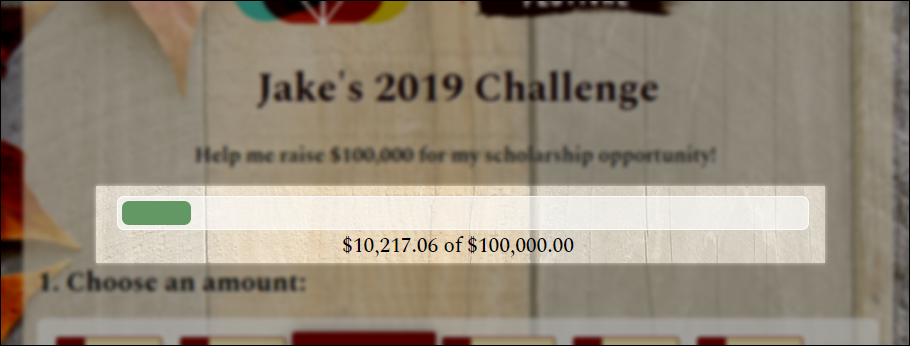
This progress tracker is visible to the public.
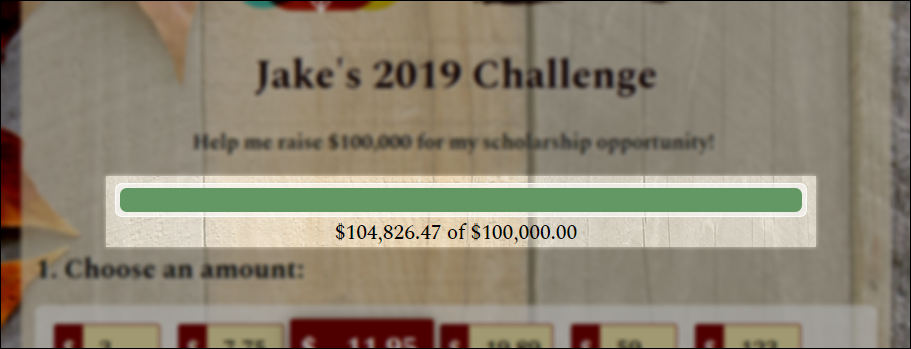
When the goal is reached, the progress bar simply reaches 100%, and the challenge statistics continue to count up:
External Progress Tracking
Using the vcsi_iDonate_Gift_Metadata_Combined view, you can write a query or report to calculate the same challenge progress as the donation form, and display the tracking information on another website such as a RiSE website.
-- For Amount-Based Goals
SELECT SUM(GiftAmount)
FROM vcsi_iDonate_Gift_Metadata_Combined
WHERE ChallengeTemplate = '<ENTER TEMPLATE UID>'

-- For Donor Count-Based Goals
SELECT COUNT(DISTINCT ID)
FROM vcsi_iDonate_Gift_Metadata_Combined
WHERE ChallengeTemplate = '<ENTER TEMPLATE UID>'
Notes on Challenge donation statistics
Donate Now - Premium only records challenge statistics if the template mode is currently set to Challenge.
A template can exist prior to it becoming a "Challenge Template", and if donations are entered against that template, they will not affect the challenge statistics.
Similarly, if a template is set to Challenge, and then sometime later is changed back to Standard, Donate Now - Premium does NOT delete the previous challenge statistics for that template - they are still available in the gift metadata for historical purposes.
Therefore, if a template was previously in Challenge mode, reset to Standard mode, and then changed back to Challenge mode, it will retain its previous statistics from the first time that it was set to Challenge.
Note: To start a new challenge campaign with different donation statistics, use the Save Template As... feature to create a new copy of the template.
If you need to delete challenge statistics for a template, contact support to get assistance with updating that data for you.