Last updated on: June 23, 2026
Calendar
Released with ICE version 5.1, a new calendar control option provides a way to use a typical calendar display to show specified dates.
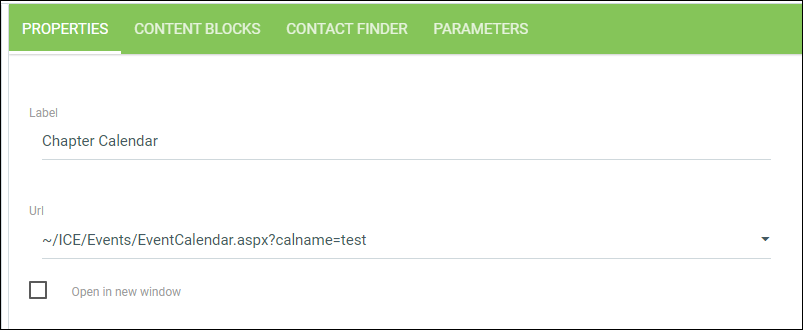
- Add a new sitemap node and select the "~/ICE/Events/EventCalendar.aspx?calname=" option. You can have multiple calendars showing different data so you should add a unique value after the "=" sign to identify each calendar in use.
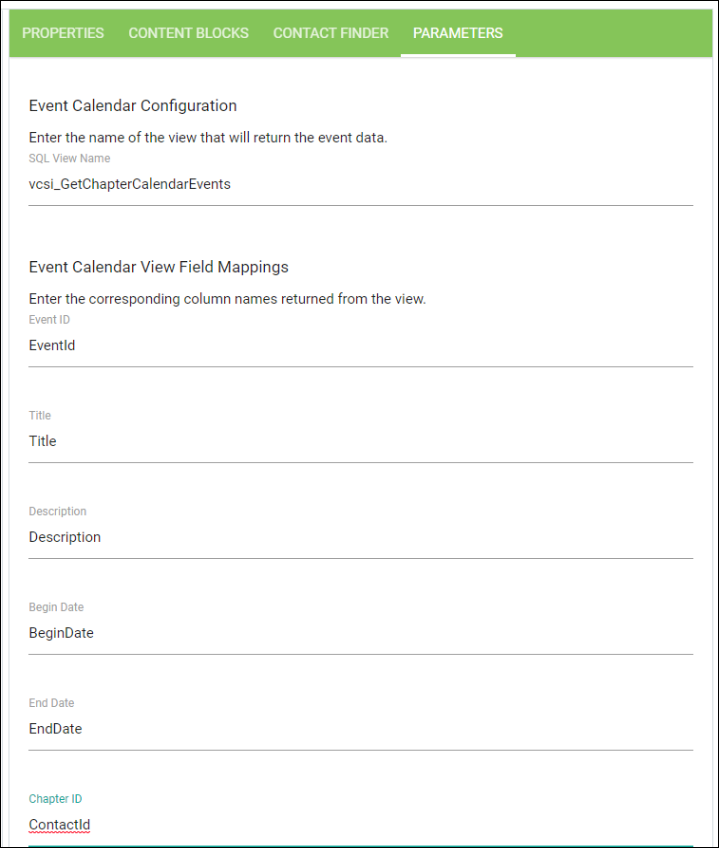
- Once properties are saved, click the Parameters tab. A view is required to supply the calendar with the data you would like to display. The view should return the following fields:
- Enter the name of the view on the Parameters tab.
- Enter the field names provided by the view to define each field:
- Once data is submitted, events will appear on Calendar.
| Field | Data type | Description |
|---|---|---|
| Event ID | CHAR | ID to identify unique event (workflowtran_key could be used). |
| Chapter ID | CHAR | ID to be passed in for ContactID parameter. |
| Title | CHAR | Title to be shown for event. |
| Description | CHAR | Description to be shown for event. |
| Begin Date | DATE or DATETIME | Start date of event |
| End Date | DATE or DATETIME | End date of event |
The following is an example view:
Copy
CREATE VIEW [dbo].[vcsi_GetChapterCalendarEvents]
AS
    SELECT
        d.WORKFLOWTRAN_KEY as EventId,
        d.ID as ContactId,
        d.Title as Title,
        d.Description as Description,
        d.CD_Start as BeginDate,
        d.CD_End as EndDate
    FROM    Demo_Chapter_Dates d
GO